Members and member history
Find a dancer, see what they hold and how reliable they are, follow up on try-outs, keep staff notes, and export the list.
For owners and managers
Members lists every dancer at your school: what they hold, how often they come, and how they found you. Open anyone for their full history.
Where: sidebar → Members.
Who: owners and managers. Teachers have My dancers instead: the people in the classes they teach.
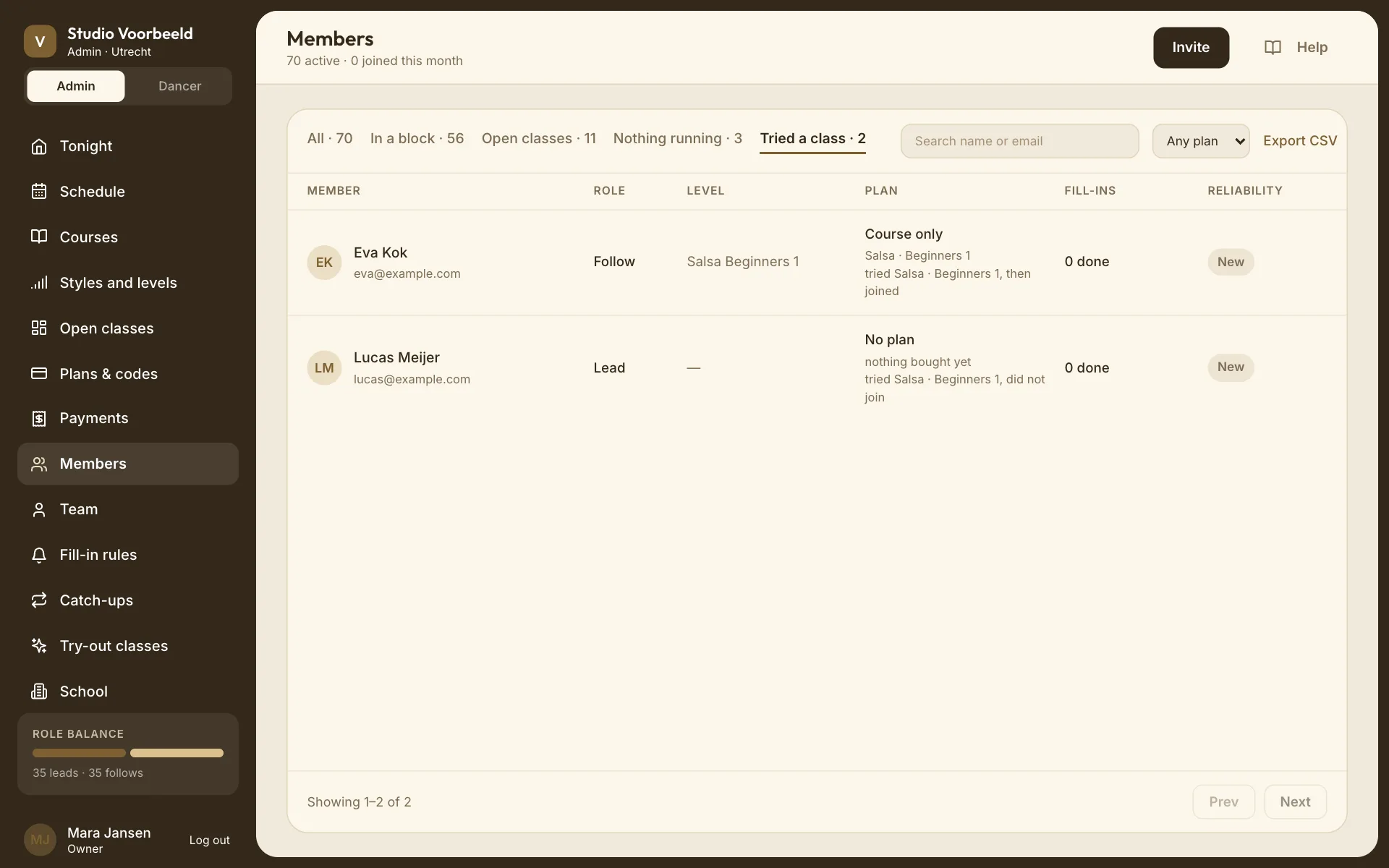
The list#
The subtitle counts active members and how many joined in the last 30 days.
Tabs#
| Tab | Who's in it |
|---|---|
| All | Every dancing member. |
| In a block | Holding a seat in a course. Only shown if you run courses. |
| Open classes | On a credit plan this month, with no course seat. Only shown if you sell credit plans. |
| Nothing running | No course seat and no plan this month. |
| Tried a class | Everyone who's taken a try-out, whatever happened next. Only shown once somebody has. |
A dancer in a block who also has a plan is under In a block.
With more than one plan, a Plan menu narrows any tab to one plan. Search name or email searches within the tab.
Columns#
| Column | Shows |
|---|---|
| Member | Name and email. |
| Role | Lead, Follow or Both. |
| Level | Their level per style, as they set it. Teacher · all levels for staff. |
| Plan | "Regular · 5 of 8" (credits left of the month's total), Unlimited, Course only with the course, No plan, or Staff. Red when their last payment failed. |
| Fill-ins | How many they've done, and under it any late drop-outs. Whether they turned requests off is on their own page. |
| Badge | Reliable, New or Watch (below). |
For people on the Tried a class tab, the Plan column also says how their try-out went: "tried Salsa · Beginners 1 · still deciding", "tried …, then joined", "booked …, never came". See Try-out classes.
Reliability#
| Badge | Means |
|---|---|
| New | Fewer than three classes or fill-ins turned up to. |
| Reliable | At least three, with no no-shows and at most one late drop-out. |
| Watch | At least one no-show, or more than one late drop-out. |
It counts classes they actually turned up to, from your registers, not bookings. That's why taking attendance matters.
Invite#
Invite shows your six-character join code and your school's public link, each with a copy button. Dancers can join with either, or by finding your school in the app. Booking a class makes someone a member too.
To put a specific person into a class or course, use Add dancer on that class instead; see G08.
Export CSV#
Downloads what's on screen: the current tab and plan filter. It includes name, email, phone, role, levels, plan, credits left, courses, reliability and member-since date.
One member#
Click a row. The page has a rail on the right with their Plan (credits left and when they reset), how they dance (Dances as, Covers as, Levels, Free to fill in, Fill-in requests), and their Standing: late drop-outs, no-shows and classes danced.
Previous and Next at the top step through the list you came from.
Tabs#
| Tab | What's there |
|---|---|
| Overview | Credits left, classes danced in the last 12 months, fill-ins claimed, catch-ups used; how they found you; where they dance; what they did lately. A failed payment is shown at the top. |
| Fill-ins & catch-ups | Every fill-in request sent to them and what they did with it: times asked, claimed, median time to claim. |
| Enrolments | Their blocks, current and past. |
| Attendance | Every booking and what happened. |
| Payments | What they've paid you, with refunds and failures. A payment partly given back reads Part refunded and shows how much went back. |
| Log | Everything about them, in order. |
| Notes | Staff notes. |
Their choices are theirs#
Role, levels, which roles they'll cover and when they're free to fill in are the dancer's own settings, from their profile. They're shown here so you can see why someone was or wasn't asked to fill in, but you can't change them. See Why wasn't this dancer asked?.
A failed payment#
If their last payment failed, the Overview says so and what it means for them. You can't charge their card or send a payment link from here. They pay again themselves.
Give money back#
Refund… appears under a paid block on Enrolments, and beside a paid class or block on Payments, while there's money left to give back. Owners and managers only.
It asks first, Refund Sanne de Vries?:
- what they paid, and anything already refunded;
- Amount (€), filled in with what the rules would give: all of a single class, and for a block the weeks still to come ("The 3 weeks of 6 still to come come to €60.00. You can give back anything up to €120.00."). Change it to any amount up to what's left;
- if their place is still to come, Also take them out of …, off by default. Tick it and they lose the place and are told straight away, with the reason you type;
- Refund €… or Refund €… and take them out. Keep it backs out.
The money goes back to their card straight away and can't be taken back. They get an email once Stripe has sent it. If Stripe refuses, nothing is sent and the button stays so you can try again.
Plans and top-ups have no Refund…: that money bought credits they may already have used. Refund those in Stripe if you agree to.
Staff notes#
Under Notes, type a note and choose Add a note. "Every member of your team can read these. The dancer cannot." Each note shows who wrote it and when, and can be deleted.
Removing a dancer#
There's no way to remove a dancer from your school yet. You can take them out of a course (see Manage course people) or out of a single class from its roster. Someone with nothing booked simply shows under Nothing running.
Staff who also dance are managed on Team.