Read a lesson roster
Who is in a class and why, including course seats, fill-ins, catch-ups, try-outs, held and unpaid places, and how the balance and capacity are counted.
For owners, managers and teachers
Open any class from Tonight or Schedule to see who's coming, and why each person is there.
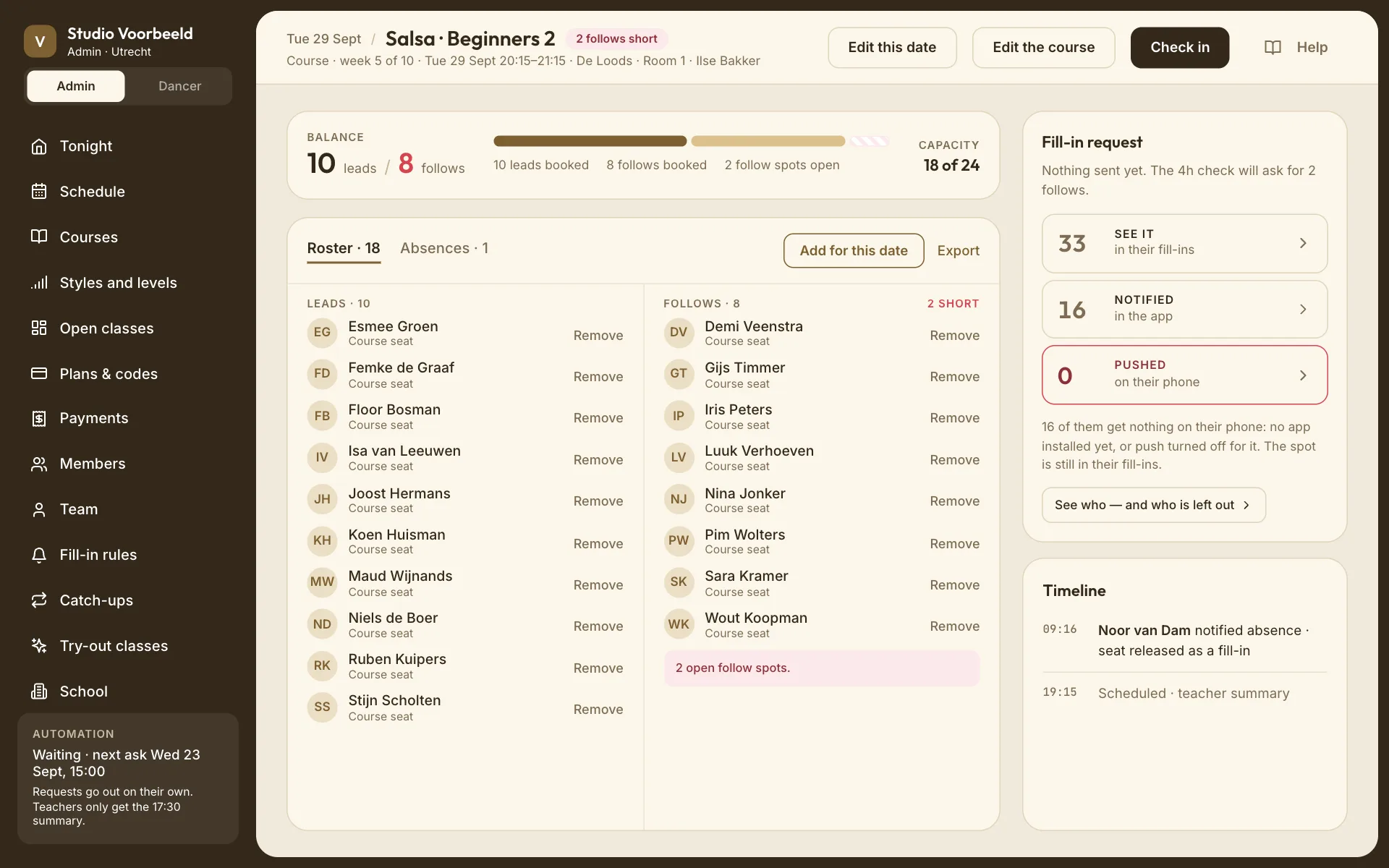
Why someone is in the class#
Each name has a short note:
| Note | Meaning |
|---|---|
| Course seat | Enrolled in this block. |
| Course · absent | Enrolled, and said they can't come this week. Their place was offered on. |
| Course seat · unpaid · 2 days left | Added by staff and asked to pay; the place is held until the deadline. |
| Fill-in · claimed 12:41 | Claimed a fill-in request to balance the class. Free. |
| Catch-up | Making up a week they missed in another group. Free. |
| Catch-up · spot held | A catch-up still being confirmed. |
| Trial class | A newcomer's try-out. |
| Paid per visit | Paid for this single class. |
| Free | A free class. |
| Plan name · credits left | Booked with credits, for example "Regular · 5 credits left". |
| Unlimited | Booked on an Unlimited plan. |
| Paying now | In checkout at this moment; the place is held while they pay. |
| Given by name · free | A free place given by your team. Given by the school · free when there's no name to show. |
Fill-ins and catch-ups stand out on the roster, because they're the people a teacher may not know.
Balance and capacity#
The balance card counts leads and follows separately against the class's cap per role ("12 of each"). It tells you when one side is full: "Full for leads. Follows have room."
- A solo course counts everyone together.
- An event has no roles: "No roles in this class, so no requests." Its page counts who is In the room instead; see Let people in at the door.
- If someone was added after the class filled, the cap was raised for this date only: "Cap raised to 13 for this class only".
The fill-in request#
When fill-ins are on, the Fill-in request card shows what the class needs. It's one of:
- "Balanced. A request opens on its own if the gap grows."
- "Nothing sent yet", with when the check will run;
- a live request: how many were asked, and who claimed. Managers can Stop asking or Start asking again. See G04.
Add someone to this date#
Managers can add a dancer to one date, free or with a price to pay (on a course, the button reads Add for this date). See G08: Add a dancer.
Timeline#
At the bottom, the class's history: bookings, cancellations, fill-in asks and claims, changes to the date.
Export#
Download the roster as a spreadsheet (names, emails, roles, source, status, attendance, plan). Teachers can export only their own classes.