Dancer handout: missing a class
For your dancers. What to do when they can't make a course week or a booked class, how to catch up a missed week, and how fill-in requests work.
For dancers
A page for your dancers. Send them the link, or copy the parts you need.
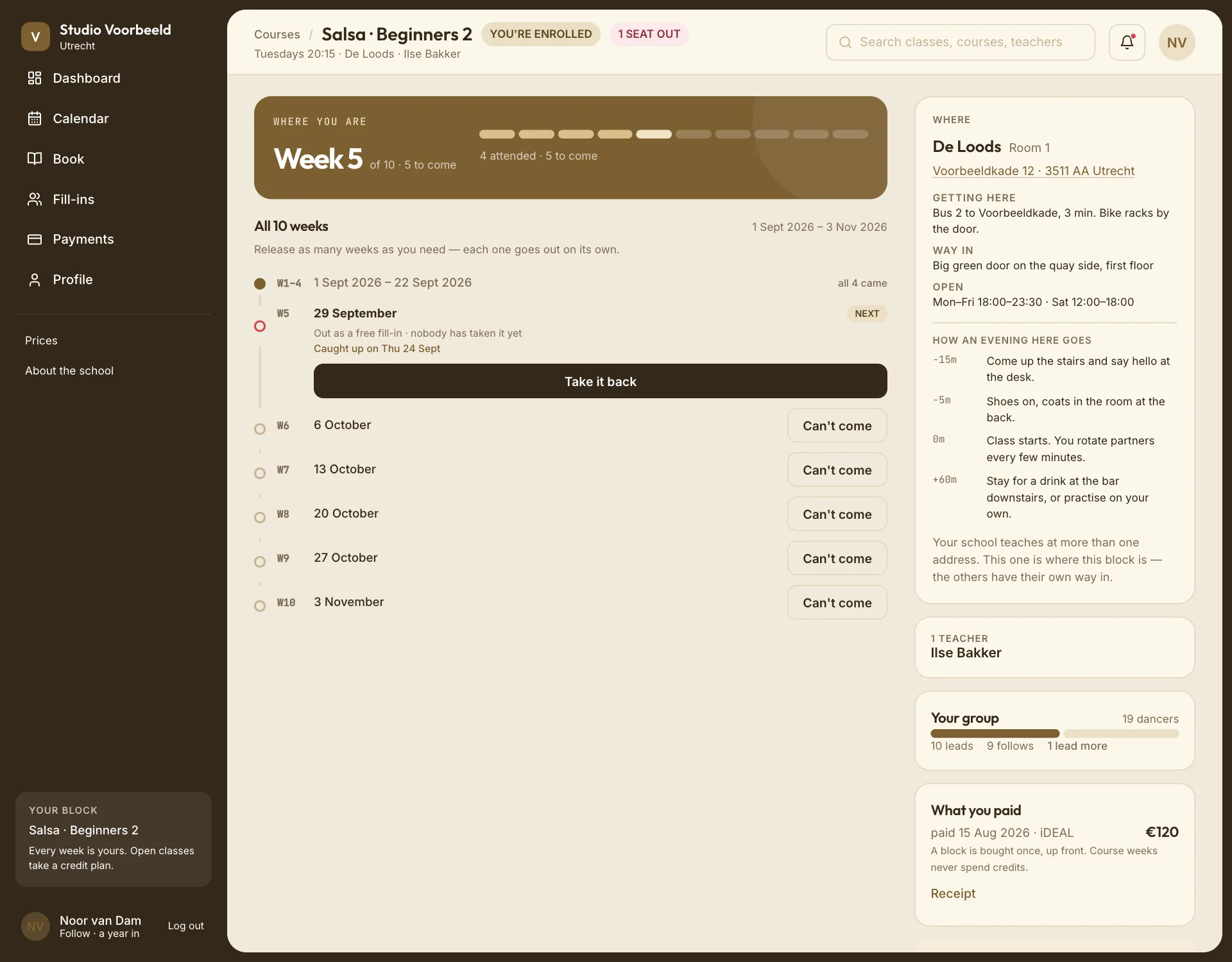
Can't make it? What to do depends on whether it's a week of a course or a class you booked.
A course week you can't make#
Tell the school before the class starts. It keeps your seat, and it may let you make the week up.
- Courses → open your course.
- Beside the week, choose Can't come.
- Confirm with Release it.
Or open that evening's class from your Agenda and choose I cannot make this week, then Notify absence. On Home, the class has a Notify absence button of its own.
"Your seat stays yours for the rest of the block. Only this week is given up." If your school uses fill-ins, your place that evening may be offered to another dancer, so the class stays balanced.
This doesn't cancel the course. Your other weeks are unchanged.
Changed your mind? Before the class starts, choose Take it back on that week of your course, then Come back. From the class itself, or on Home, it's I can come after all. If someone has already taken your place for that evening, or you've booked a catch-up for it, the app tells you what coming back would undo before you confirm.
Catch up the week#
If your school offers catch-ups, you can make up a week you told them about in advance, in another group or class.
- First tell the school you can't come, as above.
- On your course, choose Catch up for that week.
- Pick one of the classes offered, and confirm.
"Taking one of these costs nothing and uses no credit — you already paid for that week."
- Which classes are offered, and how long before or after you can go, is your school's choice. The window can include classes before the week you miss.
- There may be a limit on how many weeks per course you can catch up.
- If you book a catch-up and then don't go, the week still counts as used.
- If nothing is offered, the app says "Nothing at your level covers that week yet." Check again later, or ask your school.
Only a week you told the school about before it started can be caught up. A week you simply didn't turn up to can't.
A week your school cancels is different: you'll be told, but it isn't a missed week you can catch up.
A class you booked#
Open it from your Agenda or Home, choose Cancel this class, then Cancel it. Whether your credit or money comes back depends on how early you cancel. The app tells you before you confirm. Cancelling in time frees the spot for someone else.
If you just don't turn up, you're marked absent, and the credit or payment isn't returned.
Fill-in requests#
When a class is short of leads or follows, your school may ask dancers who fit to fill in, for free. Requests appear under Fill-ins, and as a notice.
- Claim one and you're in. There's nothing to pay.
- You're only asked for classes that suit your role (and your level, unless your school asks every level), and that don't clash with your own bookings.
- Don't want requests? Turn them off on the Fill-ins page. You can also say there which roles you'll cover and which days you're free.