Manage course people
The Who is in page of a course. Everyone with a seat in the block, places waiting for payment, try-outs deciding, and email invitations; how to add and remove people.
For owners and managers
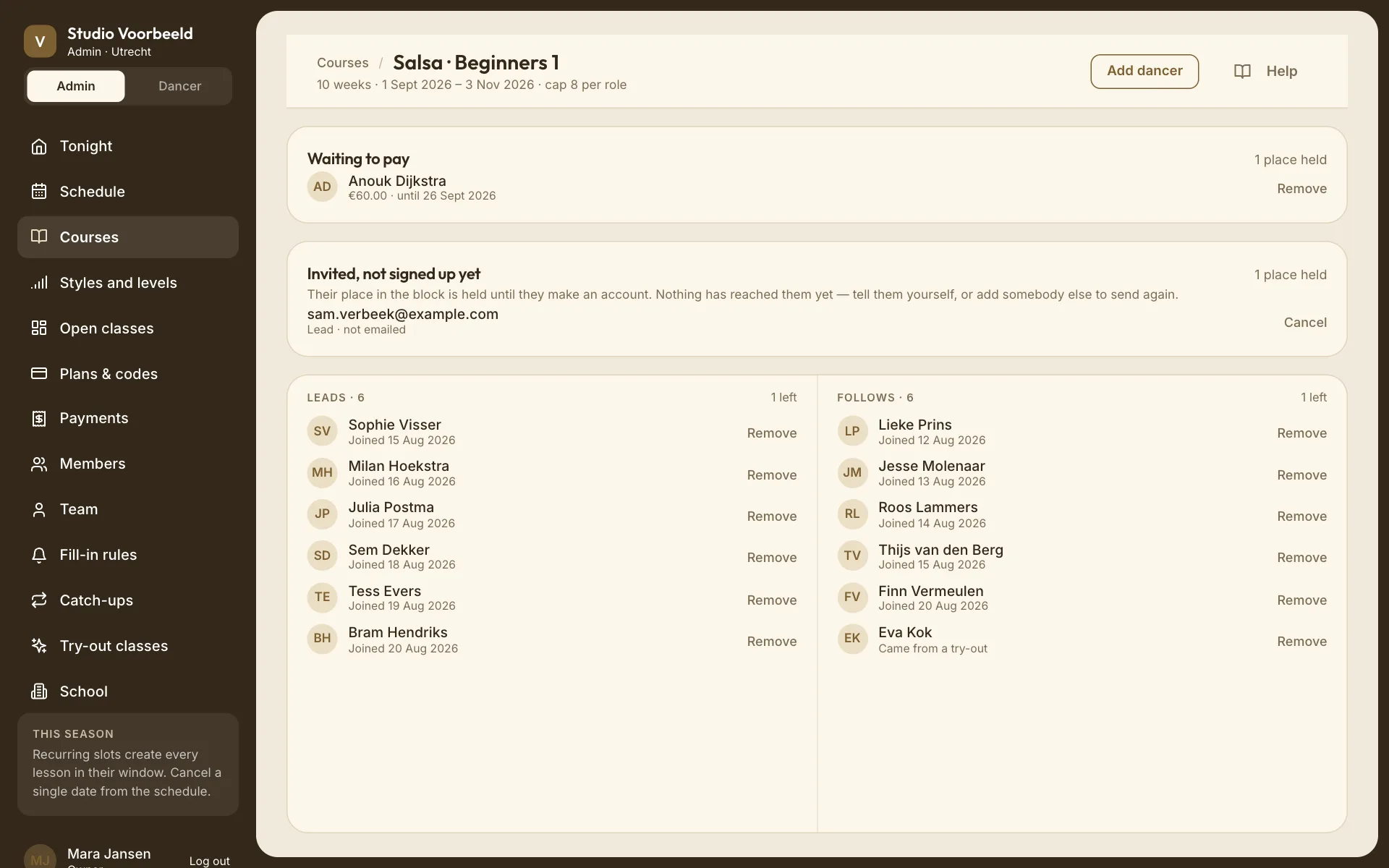
Every course has a Who is in page: everyone holding a seat in the block, for every week. It's where you add someone to the whole block, or take them out.
Where: Courses → a course → Who is in · 14 in the top bar.
Who: owners and managers.
To see who's coming on one evening, including fill-ins and catch-ups, open that lesson instead; see Read a lesson roster.
The page#
The top bar shows the number of weeks, the dates and the cap: "10 weeks · 6 Jan 2027 – 10 Mar 2027 · cap 12 per role". For a solo course it shows how many people fit.
Leads and Follows#
Two columns, each with how many places are left or Full. A solo course has one column, Dancers. Under each name, how they got in:
| Line | Meaning |
|---|---|
| Joined 3 Sept 2026 | Enrolled and paid themselves. |
| Came from a try-out | Enrolled after trying a class. |
| Added by the school · free | Your team put them in, free. |
| Place opened by the school · €60 | Your team gave them a place at a price, and they paid. — not paid yet if they haven't. |
A note at the top counts seats given away free: "2 seats given by the school — nobody paid for them."
Waiting to pay#
Places your team opened at a price, with the amount and the deadline: "€60 · until 26 Sept 2026". If they don't pay by then, the place goes back on sale by itself. How long people get is A place you hand out: days to pay under Cancellations.
Deciding after a try-out#
Seats kept for someone who tried the class and hasn't decided yet: "Tried the class · seat kept until 30 Sept 2026". There's nothing to pay here. The seat is released by itself when their window ends. See Try-out classes.
Invited, not signed up yet#
Places held for people you invited by email who haven't made an account yet. not emailed means the invitation email didn't go out: tell them yourself. Cancel gives the place back ("The place held for sam@example.com is back on sale.").
Add someone to the block#
Add dancer (on a published course) opens Add to course name. "A seat in the block — every week, all 10 of them." See G08: Add a dancer, or invite one by email for the whole dialog.
If the block is full, the dialog says so first: "This block is full — adding anybody raises its cap for all 10 weeks." Adding someone then asks you to confirm with Add anyway. For a partner course the cap is per role, so a place opens on the other side too.
Remove someone#
Remove beside a name, then confirm. "Anouk Dijkstra loses their place in Salsa · Beginners 1 and is told straight away. The spot goes back on sale."
- They're taken out of every week still to come. Weeks already danced stay in their history.
- If they paid, the dialog has a tick Refund €…, on by default. For a block that has started it's the share for the weeks still to come: "They paid €110.00 for 10 weeks; €44.00 is the 4 weeks still to come." The button reads Remove and refund €…. Untick it to keep the money (Remove without refunding); they aren't told anything about it, so only do that if you've agreed it with them.
- A seat still waiting to pay, or a try-out seat, is removed straight away.
A dancer cancelling their own block follows your block cancellation window instead; see Cancellations.
What you can't do here#
- Move someone to another course. Remove them here and add them to the other one.
- Change someone's role. Remove them and add them again with Dancing as set.
- Add people to a draft. Add dancer appears once the course is published.