Read Payments and export
What dancers paid you this month or year, what was refunded or failed, where the money came from, and how to filter and export the list.
For owners and managers
Payments shows what dancers have paid your school. The money goes straight to your school's Stripe account. Dansly never holds it.
Where: sidebar → Payments.
Who: owners and managers.
What your school pays Dansly is separate; see Billing.
Choose a period#
At the top right: Month, Year or All time. With Month or Year, the arrows step back and forward. Every figure on the page is for the period you pick.
Kept this month#
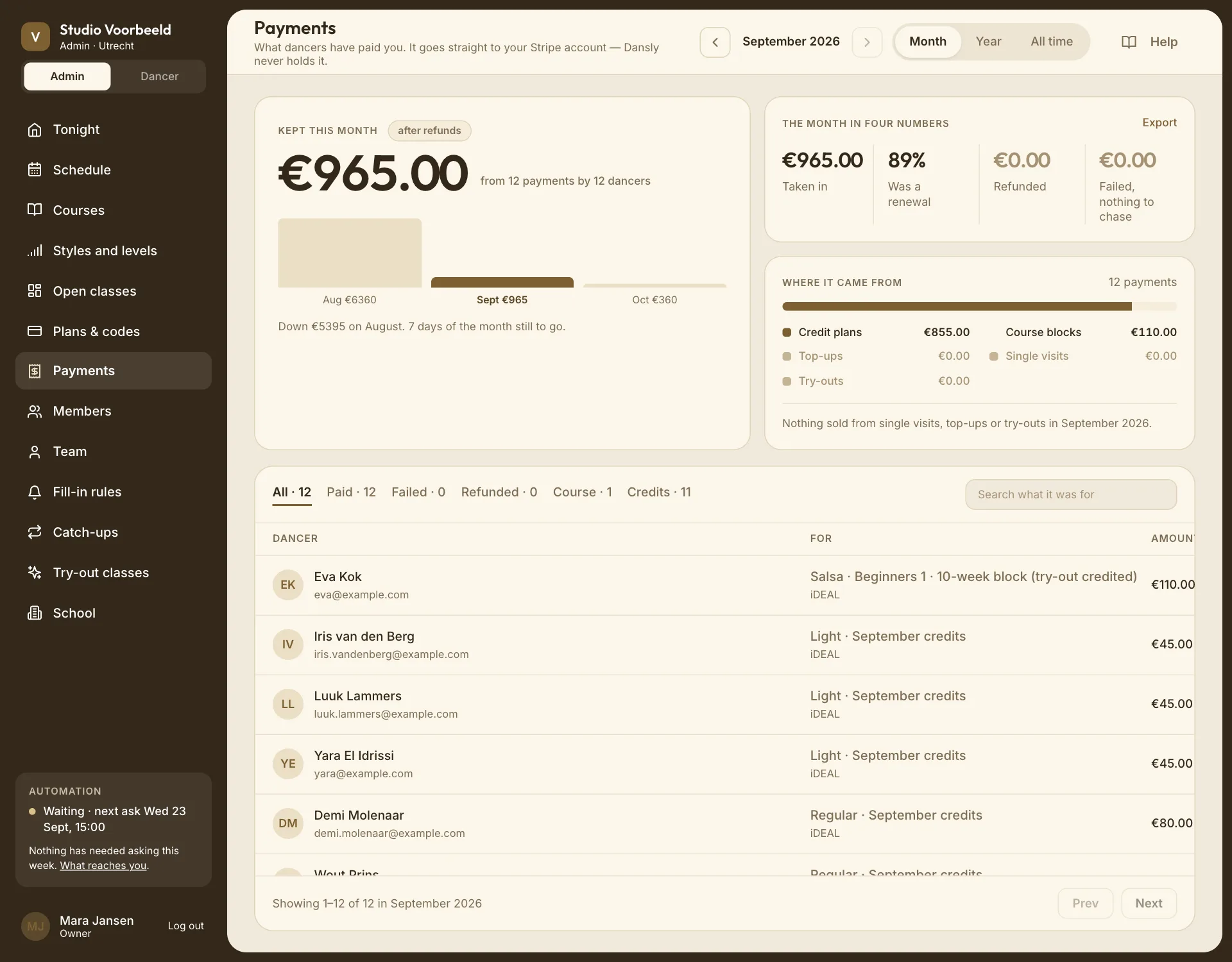
The big number is what you kept: everything paid in the period, minus refunds made in the period. It's marked after refunds.
- Underneath: how many payments, and in a month, from how many dancers.
- A comparison with the previous period: "Up €240 on August."
- A small bar per month, for the months before.
A payment taken in September and refunded in October counts in September's takings and October's refunds.
These are the amounts dancers paid, including VAT, and before Stripe's fees. For your books, use your Stripe reports or the export below.
The month in four numbers#
| Figure | Meaning |
|---|---|
| Taken in | Everything paid in the period, before refunds. |
| Was a renewal | The share of that which came from credit plans: money that tends to come back each month. Plans don't renew by themselves; dancers buy again. |
| Refunded | Money handed back in the period. |
| Failed | Payments that didn't go through. Failed, worth chasing when there are any. |
Export is beside them; see below.
Where it came from#
A bar split by what was sold: Course blocks, Credit plans, Single visits and Try-outs. Only the ways your school actually takes money are listed. If one of them sold nothing this period, a line says so: "Nothing sold from single visits in September."
The list#
Every payment in the period, newest first:
| Column | Shows |
|---|---|
| Dancer | Name and email, or "no longer a member". |
| For | What they bought ("Salsa · Beginners 1", "Regular") and how they paid: iDEAL or Card. |
| Amount | What they paid. If a discount code was used, the code and the amount it took off: "EARLYBIRD −€12.00". |
| When | The date. For a failed payment, the reason. |
| State | Paid, Refunded, Failed or Not completed. Receipt opens Stripe's receipt. |
Not completed is a checkout the dancer started and abandoned. A checkout that's still open isn't listed: it isn't income yet.
Filter#
Tabs above the list: All, Paid, Failed, Refunded, then one per kind of purchase, then one per discount code used in the period. Search what it was for searches the descriptions.
On a code's tab, a sentence sums up the campaign: "EARLYBIRD brought in €648 across 6 payments in September, giving away €72."
Filters narrow the list only. The figures at the top stay the whole period. See Numbers look different.
Export#
Export downloads a CSV of the period. When a tab or search is on, the link reads Export these and the file has only those rows.
Columns: date, paid on, refunded on, dancer, email, what it was for, type, amount, currency, method, state, code, discount, failure reason and the Stripe reference.
Hand the file to your bookkeeper along with your Stripe payout reports. Stripe's reports show fees and payouts to your bank; this list doesn't.
Refunds#
There's no refund button on this page. Refunds happen in these ways:
- automatically, when a dancer cancels in time and your cancellation settings refund that kind of booking, or leaves a block before its window closes;
- when your school cancels a date, ends a class or cancels a course, unless you untick Refund in the dialog;
- when you remove someone and leave Refund €… ticked;
- from a member's page, with Refund… on a payment or enrolment;
- by hand, in your Stripe dashboard, for anything else.
A payment that was partly given back, such as the weeks of a block that won't run, shows as Part refunded.